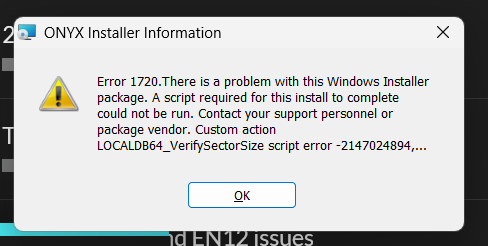
I’m trying to install Onyx in my computer for the first time, and when I try to install, this error appears. I’ve tried all the +COM resolutions, but I don’t get any error when I open Component Service and click in +COM. Someone can help?
Hi @RoscoLux
Welcome to the forum.
Really sorry to see you have encountered this error. Please restart your PC, and then go to Windows Settings > Apps > Installed Apps. In here, do you see “Obsidian Control Systems Driver Package”, or “ONYX”? If so, please attempt to uninstall these from Windows Settings.
Please then attempt to run the ONYX 4.32.1302 installer again, and let us know how you get on.
Edward