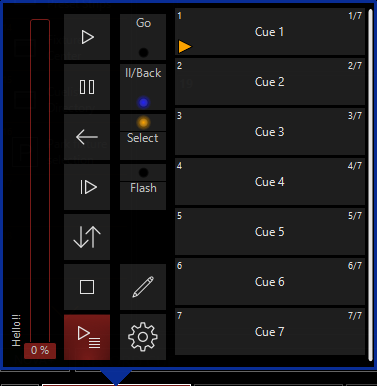
On the heels of the new tracking & cue options (the ‘release’ parameter is a game changer!) - and having just read about the work-in-progress feature to “split” playbacks so the buttons / faders within a playback strip can have different objects assigned to them, I’m raising another suggestion that would add a great deal of functionality.
In addition to the existing button actions (Go, Back, Pause, Release etc.), I’d love to see the addition of a few others, not entirely dissimilar to GMA –
Top or ‘First Cue’: go to the first cue in the cuelist
Go-To XXX: Prompts for the insertion of a cue number. From there, this button will always go-to the specified cue number. Very helpful for use in conjunction with links, and / or for similar functionality to the “off” cue in GMA
Go-To: An action that always prompts which cue to go to (similar to the existing “Direct Cue” function; except the UI for the existing function is not ideal when a cuelist has many cues)
Load Active / Load Active + Inactive: Brings the active (and inactive?) values of the current cue into the programmer
Select Active: Selects the fixtures with active values in the current cue
Could probably think of a few others given some time, but this would already make for a huge workflow improvement. Next up will be some basic output filters I’ll save that for another post!
Thanks for the acknoweldgement, Edward! Happy to see it added to the list
Re: the ‘cue X enter’ syntax - I’m already familiar with that and use it regularly, but it’s only useful when you have memorized the exact cue number you wish to transition to. A function similar to GMA’s “go to” action would be fantastic
I’m not familiar with MA’s go-to action. Would you be able to explain how this aids your workflow? If you click go-to, and are not sure of the number of the cue you wish to go to, what is shown on screen? Or, do you type go to, and then type the name of the cue you want to go to?
The ‘go to’ action is assigned in GMA the same way “go”, “back/pause” actions can be assigned to playback buttons + keys in Onyx. In GMA, when a button that has this action assigned to it is pressed, the screen the shows a nice, large pop-up dialogue box with the names of every cue in that cuelist. Touching the desired cue closes the dialogue box and commences the transition.
This is an interesting idea. I have logged the ability to display a cuelist as an array of buttons as ONYXRM-105. Potentially a playback button could then be a shortcut to opening this window.
Would this be similar to the direct cue option? When I have a playback button or fader “expanded” I can set direct cue, and then go to that cue within the cuelist.
Seems similar expect that you are now assigning that to the button press, if I understand correctly. If so, I do like the idea.
 I’ll save that for another post!