It would be nice to set function keys setup based on the workspace, as I may have different needs per Programming or Playback.
1 Like
Hi @jsnmllr1981
This can be done, by switching the Function keys between “Private” mode, or “Shared” modes.
To do this, click the ONYX logo top-left, and then choose Workspace > Unlock:
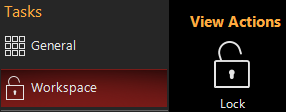
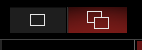
Then go to Functions to edit your Function keys. You can then use the mode button at the top, to decide whether your Function keys are shared across all workspaces, or whether they are different for each workspace:
Please let us know if you have any questions.
Edward
1 Like
Awesome, thanks  totally missed that
1 Like
This would be another great topic for your ONYX Tips and Tricks. I knew that option was there but always thought it referred to the created views and layouts. Never realized until this post that it applied to Function Keys. Another thing learned.
Watson
Good idea. I have added this one to the list of “Did You Know” topics, that are posted on our social media channels.
1 Like