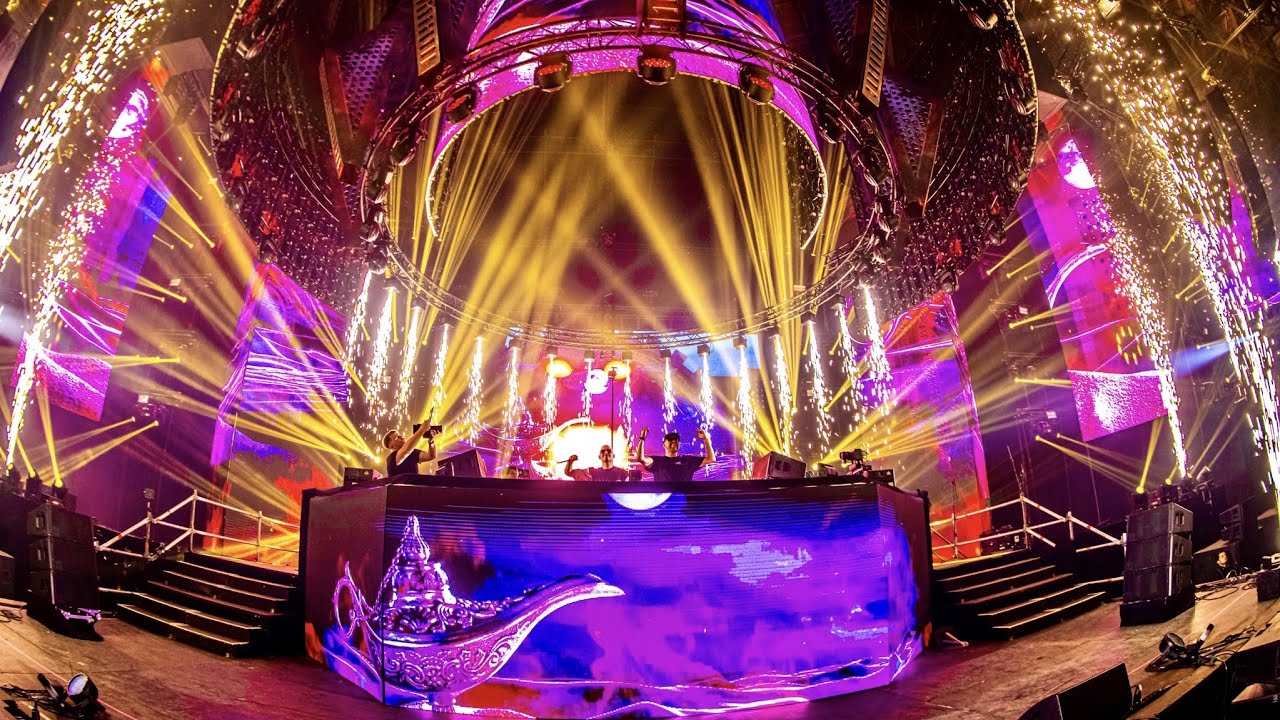
Maybe a short question, but for now I didnt get it to the perfectly working settings. How to build such an effect with moving heads like shown here:
I mean let them start a pos a, turn on, go up, turn off and then back to start.
I know there is some P/T-Fall Dimmer effect in the FX Program, but that one uses sine waves to create that effect. So depending on the speed you would like to make it run and the amount of steps you have, the initial going “down” (so changing the Tilt in that case) takes to much time.
Hi, tell me.
Is it possible to reset the effect phase? Because when calling presets or cues sequentially, they do not start from the beginning of the sine wave, but as if in continuation. This is very inconvenient. I have Onyx 4.10.1271 M-DMX.
For example, I want to call a cue that contains 2 waves. and then a cue with intensity turned off. And so on cyclically. But so that the two waves of flashes begin from the moment of the new call and not as now, where the phase of the sine wave will be at the moment, there the cue will begin. I suspect that the phase is somewhere inside the program all the time ticking and we only join it?
What was the solution for that. I had the same issue on the gig on the weekend. Sometimes it started in sync and sometimes totally out of sync. So it is not predictable how the effect will look like when fireing it up.
This issue is logged as reference number ONYX-1209 on our system. This will not be included in ONYX v4.32, however our software team will investigate this.
Sorry I am a bit late but maybe I can share an other approach that I use all the time (I love this effect a lot)
The way I do it :
Create some preset positions for the movers (UP, DOWN, LEFT, RIGHT, etc..)
Create a “Chase” cueslist (very important because you will want it to be BPM synced to get that Reverze effect, like in the video)
In the Chase:
1st cue:
group 1 = position DOWN, dimmer ON
group 2 = position UP, dimmer OFF
group 3 = position UP, dimmer OFF
2nd cue:
group 1 = position UP, dimmer OFF
group 2 = position DOWN, dimmer ON
group 3 = position UP, dimmer OFF
3rd cue:
group 1 = position UP, dimmer OFF
group 2 = position UP, dimmer OFF
group 3 = position DOWN, dimmer ON
Sync the chase to the BPM (even works with fast tempo like 160 BPM), set fade mode to SNAP
Thats it , enjoy this amazing effect
The key is to let at least 2 steps for the mover to “replace” itself while dimmer is OFF.
If you have less fixtures (usually I have 4 movers, for small shows) you can still achieve this effect with 2 groups of fixtures, just set the 3rd cue to position UP, dimmer OFF for all the movers, here (the 3rd clip) is how it looks like.
Yeah I also thought of that way, but I like to have that as an effect to be able to play with wave/steps to make it look different depending on the need. I think the overall issue with that is the missing sync between the individual wave forms of the oscillator running for either dimmer and pan/tilt. Thats why it sometimes looks “shitty”.
Really looking forward in seeing any kind of new FX engine to have more options and those things fixed.
I tried to build this effect using the non P/T bound effects on the Tilt. I could use the modes 9 - 12 for that. The problem there is, that I always have to use a step of min 3 to make that run. So when I want to have this effect only on 2 groups I cannot use these modes. When I use 7/8 I could build that, but as this effect is pretty fast the problem with these modes is that the movement starts in one direction (like up), then intensity would go to 100%, then tilt would go down and afterwards intensity would turn off again. I would like to avoid this first up movement.
What did you mean with “and then set the parameter value to the midpoint rather than the low point?”
Modes 7/8 take the parameter above and below the current value. Therefore, the fixture’s parameter needs to be set to the midpoint to allow the effect to work around it. This is different to the modes that only take the parameter above the current value, such as mode 9 and 10.
ok - then I got your point right. The problem with that is what I described in my last comment. And mode 9 and 10 can also not be used for what I am trying to, as this always effects 2 devices at a time ( I mean thats the reason why you have to use a step of 3 in minimum to get that square do anything). So something that is a square and only works on a single device of a larger group would be (for me) really helpfull (especially when trying to build such an effect, cause from what I noticed so far is that its much more predictable how these 2 effects (tilt and dimmer) are executed).