Yes. Transparent Cues can solve this problem.
A transparent cue will only affect the cue slots that have actually sequences in them letting everything else in the other slots do what they were already doing. So if you created a transparent cue with the LED bars off and with nothing else in any of the other slots, when you loaded in another transparent cue for another light type it won’t step on the darkened LED slot.
Now, you have to program everything with this in mind. Since there are 12 slots in the cue, I broke my programming up into the following chunks:
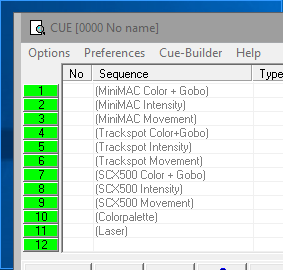
So my sequences, when I programmed them, focus only on the attributes listed in the slot labels. That means you must have all other features of that light turned off or it will screw things up when you go to the cues.
If I want the MiniMACs Blue Starburst @ 100% moving in an ellipse, then that means I have a sequence with the Blue Color and Starburst Gobo selected and nothing else. Then I create a sequence with intensity at 100% and nothing else selected. The final sequence is only the ellipse movement.
It is a pain to break things up this way but… once I had the sequences broken up this way, the mix and match becomes really easy and I can assign flash overrides to color+gobo or to intensity or movement.
I can turn groups of fixtures on and off without messing up what other fixture groups are doing. I can improv the lights all day long. I can start with a full scene with all the fixture groups going are change things out at will using transparent cues and feature segmented sequence programming.
I think I’ve droned on long enough.
HVK