Misc Feature Requests & Issues - Clone filters, 2D Plan, vDims, etc

I’m sure I’ll come up with a few others, but I figured rather than start a thread for each of these I’d just try to get them all in one place for now.

#1 - Preset type and cuelist specific filtering in Clone. I want to be able to filter presets by type for cloning - for instance only clone color and beam presets, or only clone position presets - this would be a huge help for when I have say washes that I need to copy color and beam and strobe preset data from one source fixture with no good or wrong for this use positions, but they’re in a similar hang to some spots so I could copy all the position presets over. For cuelists, just have a popup list of all cuelists containing the source fixtures in question, and be able to un-check any you don’t want to clone. Hopefully this is just toggling what database entry types or entries get used as clone sources and wouldn’t be too much of a bear to do.

#2 - Relatedly, I’d like to store/remove multiple presets at once. So if I accidentally record a value in to a preset, store/remove from a range of presets. I know hardkey presets isn’t really a thing in Onyx, but if I could just click the first, hit [THRU], and hit the last, that would be enough for me.

#3 - Please please please make virtual dimmer toggle on by default in patch. I’ve yet to find someone who doesn’t want virtual dimmer on. Please make it on by default so we don’t have to keep deleting and re-patching multi instance fixtures. Fixing this has wasted countless hours since multi-instance swap doesn’t work.

#4 - Please make actual directional selection in 2D Plan an option. Currently, if I drag select a bunch of fixtures in 2D Plan, it puts them in patch order, I would like to be able to select pixels in the order I drag the box over them. So if I drag from left to right, I want to grab all the pixels of those multi instance fixtures in the 2D Plan from left to right. If I drag top to bottom, I want to select top to bottom. See MA2 Layout Views drag select options - depending on which way you drag first, and the direction of the drag, it will select differently. I can make incredibly fast directional pixel selections in MA2 that genuinely take hours or are impossible in Onyx that would be fixed with this one thing.

#5 - In the 2D Align menu, I’d like a center option in addition to left and right/top and bottom align options. This would take the average center in vertical or horizontal. This would be exceptionally useful when aligning fixtures of different sizes in 2D Plan.

#6 - 2D Plan distribute function for evenly spreading lights is not consistent when using different fixture types. It will either clump together or sort by fixture type which is the last thing I’m after when using align/distribute with fixtures I already put in order (I have a video explaining this if needed).

#7 - Ability to have different default button function options when recording to button-only executors. I would love to be able to set the default button function for these to be flash and not have to go thru and select each one and change the down action to FLASH + GO and the up action to RELEASE. For most shows, the only thing I’m putting on the button only execs is flashes.

#8 - When a multi-instance fixture is selected, show at least the color parameters for all instances. I understand beyond the color preset/parameter type this can get dicey, but I would really like the color mix parameters for my multi-instance fixtures without having to click to have one of the cells selected as first fixture in the selection rather than just 201 THRU 208 and start adjusting RGBW for instance.

#9 - New effect waveforms / “Mode” - any way we could get some new effect options? I know this may be a really hard ask but it would be amazing to get stuff like a super small half sine wave (like 1/4 or 1/8 of the length of the full waveform) then flat low for the rest of the waveform. Both of these - 1/4 length and 1/8 length above zero curve with flat low for the remainder, and the same thing but with a ramp minus and ramp plus with flat low for most of it - would be super useful for pixel fixture effects. There’s linear type effects that I can’t really get looking right with Dylos or the current FX engine that would be fixed by adding these waveforms. Happy to provide some graphs.

So sorry for dropping this in here during the leadup to LDI, but I’m here programming the ADJ LDI show and remembering and coming up with all kinds of fun suggestions and issues and I’m writing them down this year instead of just parking them in my head, forgetting half, and mentioning a third of them to Gerardi at LDI like the last 2 years.
2 Likes

Hi @nevetshk

Welcome to the forum.

Firstly, thank you very much for taking the time to type up and report this feedback. This is all really helpful.

Suggestion logged on our system as reference number ONYXRM-108.

To confirm, would you like to delete multiple presets at once, or would you like to remove a particular fixture from multiple presets at once?

The ability to delete multiple presets at once, is logged as ONYX-1173.

Logged as ONYXRM-79.

Logged as ONYXRM-16.

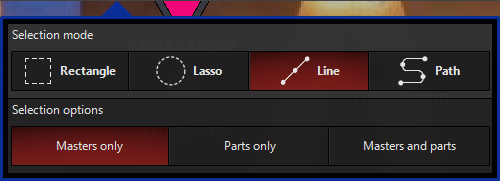
This is possible already, using the “Line” or “Path” selection modes:

This will be coming in ONYX 4.34. Logged as ONYX-1129.

Logged as ONYXRM-92.

Logged as ONYXRM-60.

Thank you once again for taking the time to write this up. I hope the programming has gone smoothly.

I’ll be at LDI, so I’m sure we’ll get a chance to chat through some of this over the next week.

Please let me know if there’s anything I can help with.

Edward

I actually just realized that this is a larger issue I’ve had going back to when I was on a martin M1 and never got resolved - I want to be able to RECORD-REMOVE parameters from presets. So hit [RECORD}, select the REMOVE option from the RECORD dialog, and remove the parameters or fixtures in question from a preset. I have a long form workaround now that involves record/overwriting the preset with all the fixtures except the ones I want to remove, but presently the record/remove syntax cannot be used on presets to remove parameters or fixtures and this has been a real hassle and cumulatively wasted hours of programming time.

What I’m looking for is a rectangle selection box that behaves like line/path. So as the edge of the rectangle passes over the cells, it selects them in that order. Doing what I’m trying to do with Line or Path would be near impossible and take forever.

Edit to add - I specifically want to be able to drag a line from top to bottom with the rectangle tool then start sweeping over cells, if the cells exist in the same vertical plane it selects them top to bottom. But if I drag that same rectangle line bottom to top first, then drag across pixels with rectangle, it will grab them bottom to top. This feature is beyond critical to my workflow in MA2 to make symmetrical groups and would be a massive upgrade for Onyx. Presently, when I drag a rectangle, it orders my selection per patch which is not what I want when trying to make symmetrical selections from a layout view. 10x to 1000x depending on the number of fixtures/pixels faster than using line or path or just click selecting everything.

See you there! I’ll be behind the console over at the ADJ booth starting tomorrow for the third year running. I’ve been on the platform as my second choice control option since the Martin M1 came out so I have a lot of history on it, but Gerardi has still taught me incredibly useful stuff that has existed in the platform that I didn’t know about both years I’ve been at LDI, so I would love to both talk through some of this with you and hear about anything that surprised you functionally coming to the platform. I only learned about Slice vs Range selection 2 years ago and it absolutely blew my mind.

While I’m here, 2 things that I know have been asked for about a million times over - I would like Undo to be able to Undo anything instead of just programmer (which I know is a bedrock redesign of Onyx, but I just wanted to make sure I say it here), and Timecode Timeline. I know someone who left the platform because it didn’t have Timecode Timeline, and I would do more on it if it had Timecode Timeline.

Thank you for the explanation. In the meantime, you could tap EDIT, tap your preset, and then type CLEAR x THRU y ENTER, to remove particular fixtures from the preset. You can then tap UPDATE to save.

Thank you for elaborating. Logged as ONYXRM-61.

Sounds good!

Logged as ONYX-07

This is a very high priority. Logged as ONYX-727.

Thanks again for your time.

Edward

Hi Edward, just checking back to see if there’s been any movement on any of these feature requests/bug reports. Thanks!

Hi @nevetshk

Thanks for following up.

The week after LDI, we had a meeting with our software team, and discussed many of these points, and how they can slot into our roadmap. ONYX 4.34 is making good progress, and we are pushing to get this available as a public beta as soon as we can.

Edward

1 Like

Amazing, thanks! It if comes out before late April (when my busy season starts), I’d love to spend some time with the Beta testing out new features. Specifically hoping for movement on ONYXRM-108, ONYXRM-79, and ONYXRM-61 since those are easier to solve than something like timecode but also huge quality improvements on the platform. Thanks!

Adding a request for Waveforms, since that was mentioned: RANDOM

Doesn’t have to be “true” random, as in encryption grade random or anything. Just pseudo-random enough to fool the average person.