Hello!
I am using the latest Onyx PC version and also the latest version of ShowCockpit. I have an Onyx Essential key. My question is, can I use two different MIDI controllers to control faders of different banks. There is an option to select different wings for different banks (I use two monitors). In ShowCockpit, the mapping does not allow me to select different faders for different MIDI controllers for Onyx OSC. What would be the possibilities to use more than ten faders simultaneously, I understand that submaster faders are not an option for MIDI mapping for Onyx OSC.
Hi @marcs
Welcome to the forum.
ONYX faders can be controlled over a network using OSC. Up to 15 separate OSC devices can be connected to ONYX, and each one can have a different wing ID, allowing each one to be on a separate playback bank.
I hope this helps. Please let us know if you have any questions.
Edward
we used midi to fader a lot in onyx.
do they remove it? thx
Hello!
I tried to create different Onyx OSC devices in ShowCockpit and linked different MIDI devices to each, but when I set the Playback fader to both during MIDI mapping, when I move the faders of one MIDI controller, the faders of the other MIDI controller also move. In ONYX, I set two different MIDI devices to different ports. Different Wing addresses are selected for different MIDI devices. When I look at the ShowCockpit graphical interface, I also see that when I move the fader, the other MIDI controller also receives feedback.
Hi @deflost
Which ONYX version are you currently running? Please could you explain how you have configured this?
Edward
With each OSC device on its own Wing ID, you will then need to change the Bank on each OSC device, so they are each viewing a different bank of playbacks.
If each OSC device is set to a different Wing ID, but each OSC device is on Playback Bank 1, they will all still be controlling the same playbacks.
Edward
Hi,
I took some pictures of the settings and below is the Google Drive link to the files
Thank you for the photos.
The settings in Menu > Remote > Devices appear to be correct.
In Menu > Remote > OSC, OSC is not enabled. If OSC is enabled on Wi-Fi with the currently set IP address, the subnet mask will need to be set to 255.255.0.0 on both devices.
I am not familiar with ShowCockpit, however the OSC network settings appear to be correct.
hello, midi to fader should work in all versions. we used it a lot and there are several posts on the dicord server, there ofer brun is telling me how to do it. i can not find a way to post the link here, but you can find the post by searching for “midi +fader +ofer brun” in the #help software category.
Hi @deflost
You are quite right - thank you for clarifying.
The trick here is to use the “EXT-FLASH” MIDI Macro. That way, the Data 2 value can be used to listen to the Control Change Level.
Edward
so please confirm, at our pc setup, at the moment i test it, i see it works for fade cl to 99% thats normal because of calcultion difficults, but in …1310 it seems to jump to 100% if you put down the fader under 1%.
so why is it like this now? in some versions ago, it works from 0 to 99%, allways and often. so maybe ofer brum is jumping in for clafication? thx.
…after a onyx restart, it works from 0 to 99% as expected, super. thank you for reminding me to that topic. who needs showcockpit? thx.
1 Like
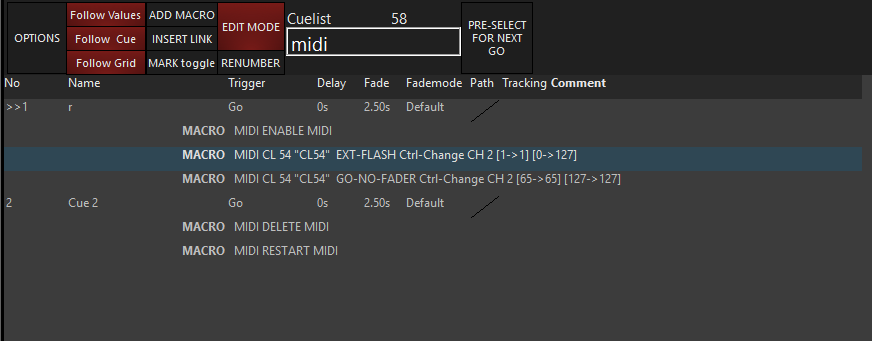
For reference, this is my configuration in ONYX 4.32.1310:

When cue 1 is triggered, this allows my Behringer BCF2000 to control Cuelists 2 and 3 from 0 - 99%, using faders 1 and 2.
Edward
…and maybe you can log in, it would be very cool if we coud use up+go and down+release together with midi to fader. in our test it does not work with midi controled cl per midi fader. or do you see an other behavior? thx.
Looks good.
In my example, I have not included an ENABLE MIDI or RESTART MIDI macro, as these are not required.
A MIDI Control Change fader, does not behave the same as the playback’s physical fader. This is why if you expand the fader ribbon, you may have your MIDI fader @ 50%, but the virtual playback fader will still show 0%. The Trigger options in Playback Options > Function Assignments, such as UP+GO, are specific to the physical fader, and do not affect MIDI faders.
We would need to think about how these options could also be applied to MIDI faders.
Edward
thank you. another strange thing is, when we use the midi release comand per midi buttom for a specific cl, the next go on this cl set the fader to 100%, it doesn´t matter if the go comes from midi or keyboardshortcut like space bar or the play buttom in the cl dopple click menue. this is not so if we use the normal snap+release from keyboard. maybe someone can have a look at this things, no easy midi mapping in 2026, but an updated version for a 4000€ console after three years because of hardware problems? that is a little funny. thx.
the next thing is that the release with next go, in the cl options menue, works!
so there is already a connection between midi and cl options, but at any point the midi coding ends?
would be nice to know for power users like us!
thx.
This is currently the intended behaviour. By default if you send a RELEASE MIDI Macro, the MIDI fader level of the released cuelist will be taken to full. This is to avoid the risk of it being locked at 0% by a MIDI fader. The GO-NO-FADER and PAUSE-NO-FADER are the dedicated MIDI commands that do not adjust the MIDI fader level.
Apologies if I have misunderstood - has your console developed a hardware fault? If it has, and you haven’t yet reported this, please send us an email to support@obsidiancontrol.com, and we can recommend the best route, should you wish to get your console up and running again.
Edward
Hello again!
Is there a way to control Main Playback Fader 11-20 via OSC? In ShowCockpit Mapping, the option ends with 10.