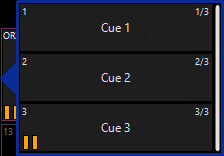
Allow in the cue list options to set specific cue list as “Direct Cue Always On”. It would be nice for specific cue list such as color wheels ect… to always pop up with the direct cue option for quicker access. Specifically for the playback button pages.
If this can be done already, please tell me. I haven’t found it
Expand the 2D plan that allows presets to be placed on the plan as well instead of just groups. Or even specific cues as well. Would be nice to be able to build different grid systems on the 2D plan that had a combination of groups, presets, cues. Kinda like the “Onyx” version of a magic sheet.
Allow CITP, or what ever the little gobo icons are or even small png files to be used as “Cue List Labels”. This would be great for gobo grids or different facet prisms, or small colored circles to be able to distinguish cue list for color grids. I realize you can label and put a color coding on them already but it would be nice to be able to see the specific gobo of that cue, or a small circle filled with the correct color instead of labels. Just a little extra polish for the UI.
In the Playback Buttons window, “Direct Cue” mode can be enabled.
When enabled, and the Playback Buttons are set to Custom, Go, Select, or Actions, clicking a Playback Button will automatically open the Direct Cue popup…
I think I should have been a little more specific in my first point.
I use the direct cue option in the tool bar often. What I was more so meaning was being able to enable that option permanently but only for specific cues. If that makes sense. I have numerous cues with multiple cues in them, but don’t use them often, and I have a few cue list with multiple cues I use all the time. This is my fault but while punting I will forget I have the direct cue option on or even off, and when I go to select that cue I either open all the cues to choose from when I just wanted to select the first cue, or I will think it’s open and select the first cue instead of opening the list to select from.
I was simply suggesting when you right click or open the specific cue options tab, where you change button assignments or cue list types, an option to permanently select that cue as a direct cue.
I hope I clarified myself with this word salad. If this seems unreasonable I get it was just a though to save myself from myself.